
Creating an Ad Unit
Before you start
- Sign up at publisher.simula.ad — your email domain must be whitelisted by the Simula team.
- Get your API key — Simula sends it via your communication channel (Slack, WeChat, WhatsApp, or email). If you haven't received one, ping your Simula contact.
Your API key is publisher/app-level and used to initialize the SDK. The Ad Unit ID you'll create below is per-placement and tells the SDK which ad format to serve.
Step 1 — Open Setup
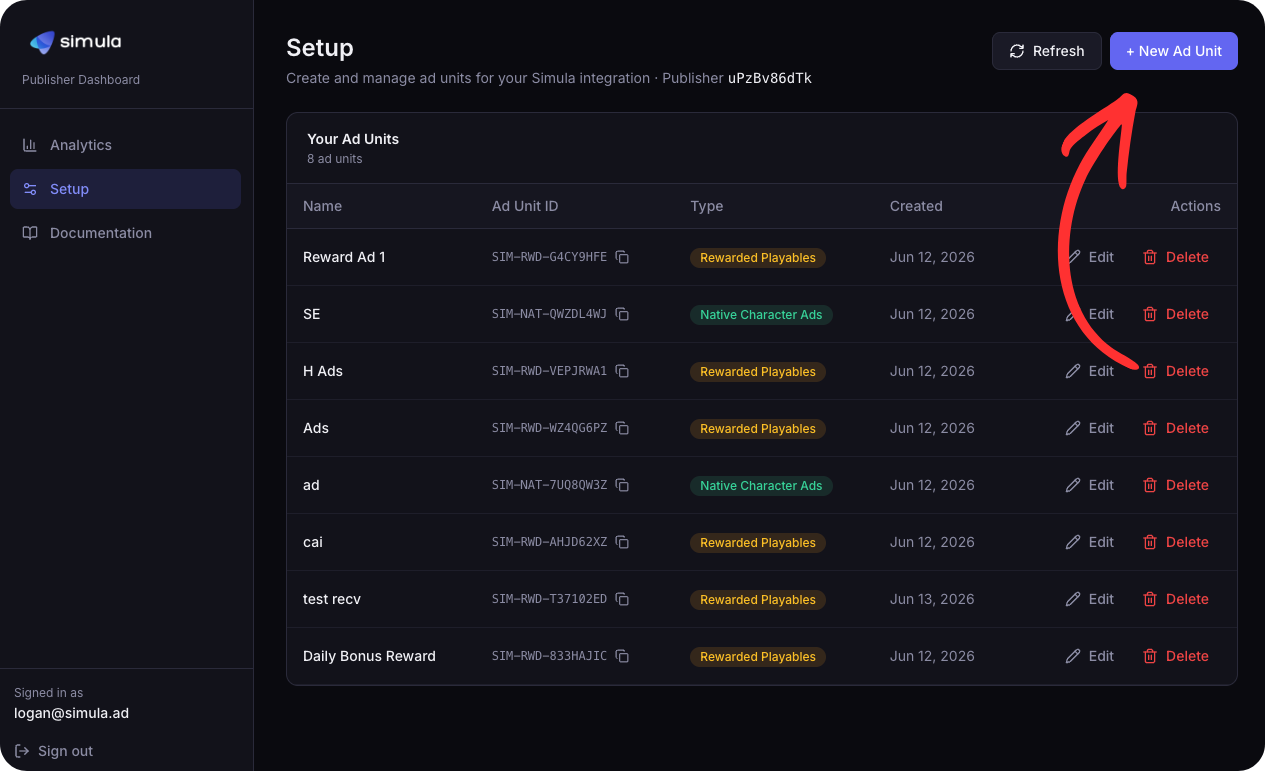
Go to Setup and click + New Ad Unit.
Step 2 — Name the Unit and Select a Type
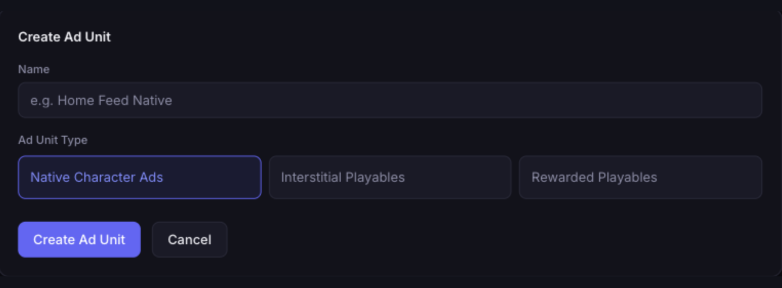
Enter a name for the ad unit and select one of three types:
| Type | Description |
|---|---|
| Native Character Ads | Native ads displayed inline within your feed |
| Interstitial Ads | Full-screen mini-games shown at transition points |
| Rewarded Ads | Users play a mini-game, then claim an in-app reward |
Rewarded ads include SSV settings
Selecting Rewarded Ads reveals an additional SSV Configuration section. See Server-Side Verification for field definitions.
Step 3 — Create and Copy the Ad Unit ID
Click Create Ad Unit. Simula generates a unique Ad Unit ID using the following format:
text
SIM-RWD-A3F9K2BX
│    │    └── 8 random alphanumeric characters
│    └── Type: RWD (Rewarded) · INT (Interstitial) · NAT (Native)
└── Always "SIM"
Copy the ID from the ad unit list — it is required for SDK integration.
Next Steps
- Add your app-ads.txt to authorize Simula as a seller
- Set up Server-Side Verification (SSV) if using rewarded ads
- Integrate the SDK — pass the Ad Unit ID to your platform:
Integration Checklist
End-to-end overview of the full integration path:
- Sign up and get your API key — register at publisher.simula.ad (email domain must be whitelisted) and get your API key from your Simula contact
- Create an ad unit in the dashboard and copy the Ad Unit ID
- Add Simula to your app-ads.txt
- Install the SDK and wrap your app with
SimulaProvider(pass your API key and Ad Unit ID) - Show your first ad — drop in a
NativeAd, trigger anInterstitialAd, or gate a reward withRewardedAd - Go live — set
devModetofalseand ship