
Server-Side Verification (SSV)
Rewarded ads only
SSV applies to Rewarded Ads only.
SSV allows your server to verify that a reward is legitimate before it is granted, preventing spoofed or replayed reward claims.
How It Works
- A user completes a rewarded ad.
- Simula's server sends a POST request to your callback URL with the user ID, reward details, a unique
transaction_id, and an HMAC-SHA256signature. - Your server verifies the
signatureusing yoursignature_secretand deduplicates bytransaction_id. - You grant the reward and return
200.
Publisher Configuration
Configure the following fields in the SSV Configuration section when creating the ad unit:
| Field | What to enter |
|---|---|
| Callback URL | Your server endpoint. Must include {user_id} as a URL parameter. Optionally include {transaction_id} to deduplicate. Example: https://internal.character.ai/simula/reward?user_id={user_id}&txn={transaction_id}. The {user_id} value is the primaryUserID you set in SimulaProvider. |
| reward_item | Name of the reward, e.g. "charms" |
| reward_amount | Quantity to grant, e.g. 10 |
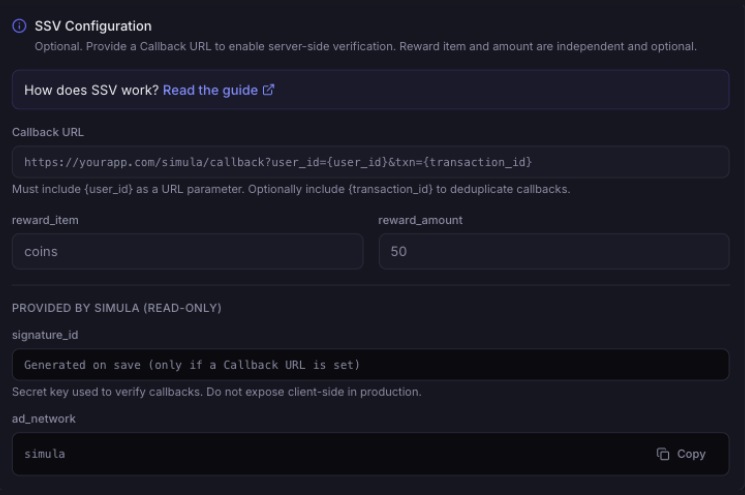
Fields Provided by Simula
| Field | Details |
|---|---|
| signature_secret | Secret key for verifying callbacks. |
| transaction_id | Unique ID included in every callback. Use it to ensure each reward is granted only once. |
| signature | HMAC-SHA256 over the callback payload, signed with your signature_secret. Verify this on every callback. |
| ad_network | Always "simula" — identifies the callback source. |
Callback Format
Simula substitutes live values into the URL template and issues a POST request:
text
POST https://internal.character.ai/simula/reward?user_id=u_98234723&txn=18fa792de1bca816048293fc71035638json
{
  "ad_network": "simula",
  "ad_unit_id": "SIM-RWD-A3F9K2BX",
  "user_id": "u_98234723",
  "transaction_id": "18fa792de1bca816048293fc71035638",
  "reward_item": "crystals",
  "reward_amount": 10,
  "timestamp": 1707770365237,
  "signature": "a3f9c2...hmac-sha256-hex"
}
Computing the Signature
To verify a callback:
- Remove the
signaturefield from the JSON body - Serialize the remaining fields as compact JSON (no whitespace) with keys sorted alphabetically
- Compute HMAC-SHA256 over that string using your
signature_secretand hex-encode the result - Compare it against the
signaturefield from the callback using a constant-time comparison - Reject the request if they don't match
js
const crypto = require('crypto');

function verifySignature(body, secret) {
  const { signature, ...rest } = body;
  const payload = JSON.stringify(
    Object.fromEntries(Object.entries(rest).sort(([a], [b]) => a.localeCompare(b)))
  );
  const expected = crypto
    .createHmac('sha256', secret)
    .update(payload)
    .digest('hex');
  return crypto.timingSafeEqual(
    Buffer.from(expected),
    Buffer.from(signature)
  );
}
python
import hmac, hashlib, json

def verify_signature(body: dict, secret: str) -> bool:
    received_sig = body.pop("signature")
    payload = json.dumps(body, sort_keys=True, separators=(",", ":"))
    expected_sig = hmac.new(
        secret.encode(), payload.encode(), hashlib.sha256
    ).hexdigest()
    return hmac.compare_digest(expected_sig, received_sig)
go
import (
	"crypto/hmac"
	"crypto/sha256"
	"encoding/hex"
	"encoding/json"
)

func verifySignature(body map[string]interface{}, secret string) bool {
	signature, _ := body["signature"].(string)
	delete(body, "signature")

	// json.Marshal sorts map keys alphabetically
	payload, _ := json.Marshal(body)

	mac := hmac.New(sha256.New, []byte(secret))
	mac.Write(payload)
	expected := hex.EncodeToString(mac.Sum(nil))

	return hmac.Equal([]byte(expected), []byte(signature))
}
ruby
require 'openssl'
require 'json'

def verify_signature(body, secret)
  signature = body.delete('signature')
  payload = body.sort.to_h.to_json
  expected = OpenSSL::HMAC.hexdigest('SHA256', secret, payload)
  # Rails: ActiveSupport::SecurityUtils.secure_compare(expected, signature)
  # Ruby 3.1+:
  OpenSSL.secure_compare(expected, signature)
end