
InterstitialAd
Full-screen ad that displays at natural transition points -- between sessions, after a conversation ends, or at a message threshold. Users play a sponsored mini-game with an AI character.
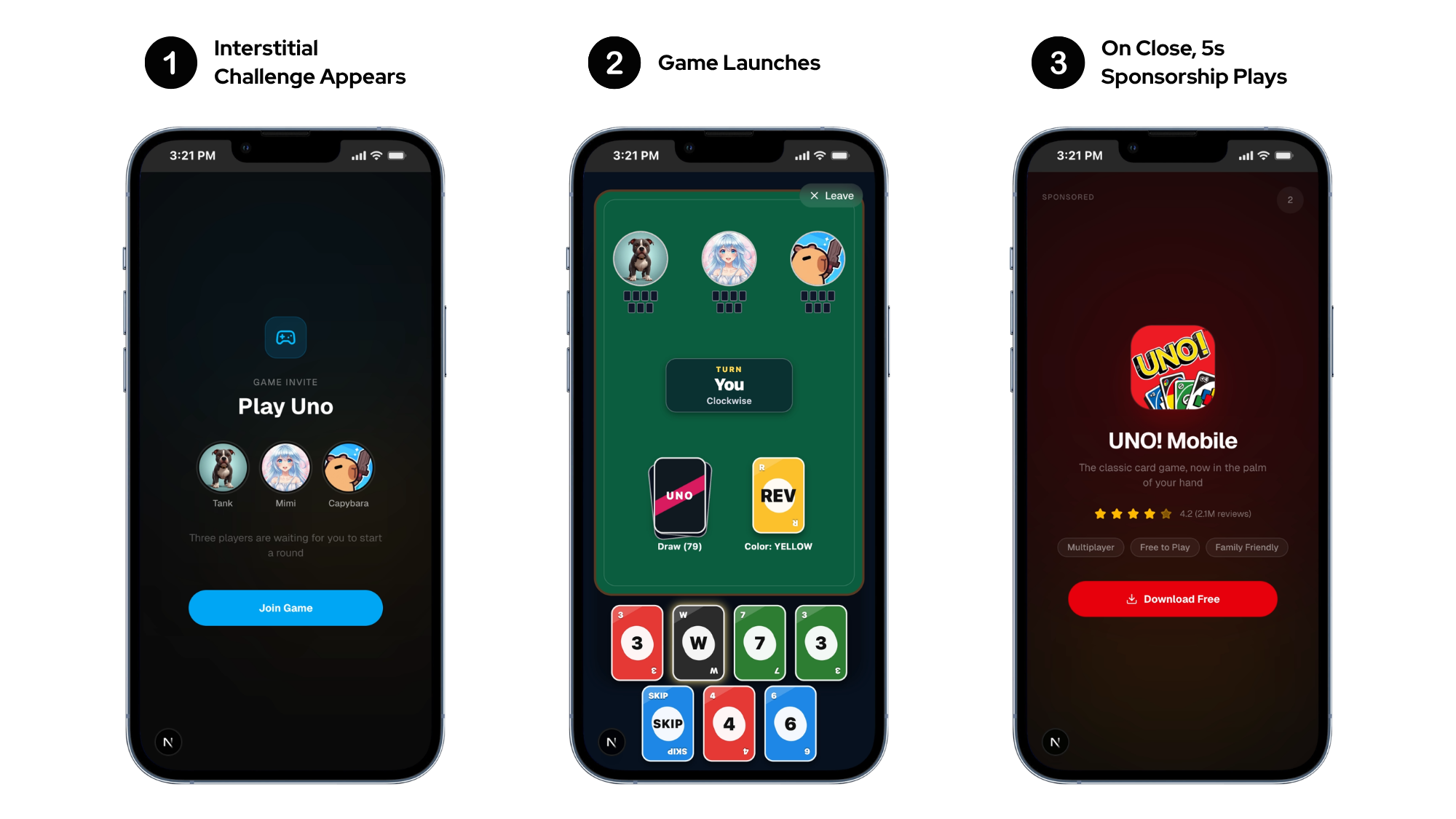
Basic Usage (Imperative)
import { useEffect, useRef, useState } from 'react';
import { SimulaInterstitialAd, SimulaAdEventType } from '@simula/ads-react-native';

function ChatScreen() {
  const [loaded, setLoaded] = useState(false);
  const retryAttempt = useRef(0);
  const interstitial = useRef(null);

  useEffect(() => {
    interstitial.current = SimulaInterstitialAd.create('SIM-INT-XXXXXXXX');

    const subs = [
      interstitial.current.addAdEventListener(SimulaAdEventType.LOADED, () => {
        retryAttempt.current = 0;
        setLoaded(true);
      }),
      interstitial.current.addAdEventListener(SimulaAdEventType.LOAD_FAILED, () => {
        retryAttempt.current += 1;
        if (retryAttempt.current > 6) return;
        const delay = Math.pow(2, retryAttempt.current);
        setTimeout(() => interstitial.current.load(), delay * 1000);
      }),
      interstitial.current.addAdEventListener(SimulaAdEventType.CLOSED, () => {
        setLoaded(false);
        // Next ad auto-preloads, but you can also manually reload
      }),
    ];

    interstitial.current.load({
      charId: 'reze-01',
      charName: 'Reze',
      charImage: 'https://cdn.example.com/avatars/reze.png',
    });

    return () => {
      subs.forEach((unsub) => unsub());
      interstitial.current.destroy();
    };
  }, []);

  const handleShow = () => {
    if (loaded) interstitial.current.show();
  };

  return <ChatInterface onTransition={handleShow} />;
}
Basic Usage (Hook)
The useInterstitialAd hook manages the ad lifecycle automatically:
import { useEffect } from 'react';
import { useInterstitialAd } from '@simula/ads-react-native';

function ChatScreen() {
  const { isLoaded, isClosed, error, load, show } = useInterstitialAd('SIM-INT-XXXXXXXX');

  useEffect(() => {
    load({ charId: 'reze-01', charName: 'Reze' });
  }, [load]);

  return (
    <Button title="Show Ad" disabled={!isLoaded} onPress={show} />
  );
}
Hook Return Values
| Field | Type | Description |
|---|---|---|
isLoaded | boolean | Ad is ready to show() |
isClosed | boolean | Ad was just dismissed by the user |
error | SimulaAdError | undefined | Last error from load or show |
load | (options?) => void | Load an ad with optional character context |
show | () => void | Present the loaded ad |
setMetadata | (key, value) => void | (metadata) => void | Attach reporting labels. See Metadata |
AI Character Integration
Pass your app's character data so the character plays alongside the user in the ad playable experience. The character commentates, competes, and engages with the user during gameplay — improving the ad experience and raising payout. Omit to use a Simula default character.
Character context drives engagement
Passing character context lets the AI companion in the mini-game match your app's character — using their name, avatar, and personality. Users see a familiar face instead of a generic character, which increases play time and ad revenue.
| Parameter | Type | Required | Description |
|---|---|---|---|
charId | string | No | Character identifier |
charName | string | No | Character name displayed in game header |
charImage | string | No | Character avatar URL |
charDesc | string | No | Character description for AI context |
Metadata
Attach up to 10 key/value labels to segment your reporting. Set them before load() — same on the imperative API and the hook:
interstitial.current.setMetadata('screen', 'chat');                    // upsert one key
interstitial.current.setMetadata({ screen: 'chat', tier: 'free' });    // replace all
Keys: ≤64 chars, no $ prefix, no .. Values: ≤256 chars. Extra or invalid entries are dropped.
Event Types
| Event | Description |
|---|---|
SimulaAdEventType.LOADED | Ad loaded and ready to show |
SimulaAdEventType.LOAD_FAILED | Ad failed to load. Retry with exponential backoff |
SimulaAdEventType.DISPLAYED | Ad displayed on screen |
SimulaAdEventType.IMPRESSION | Impression recorded (server impression beacon fired) |
SimulaAdEventType.DISPLAY_FAILED | Ad failed to display. Load a new ad |
SimulaAdEventType.CLICKED | User tapped the CTA |
SimulaAdEventType.PAID | Estimated per-impression revenue available. event.adValue contains the AdValue |
SimulaAdEventType.CLOSED | User dismissed the ad. Next ad auto-preloads |
Listening to All Events
Use addAdEventsListener to subscribe to every event on an ad instance with a single listener. Useful for analytics or debug logging:
interstitial.current.addAdEventsListener((event) => {
  analytics.track('ad_event', { type: event.type, adUnit: 'SIM-INT-XXXXXXXX' });
});
Lifecycle
- Auto-preload on close: The SDK automatically preloads the next ad when the user dismisses the current one.
- 1-hour expiry: A loaded ad expires after 1 hour.
show()fails withstale-- callload()again. - Deduplication: Calling
load()with the same parameters within 5 minutes returnsduplicate_request. Wait for the retry window or change the character context. - Cleanup: Always call
destroy()when using the imperative API. The hook handles cleanup automatically.